
Manufacturing Productivity Hub — Guided Learning
| Getting Started |
PowerMill Migration |
Import Review |
Fusion Library |
Configuration | Community | Support |
← Previous |
Configuration · 5.6 Shop Standards |
Next → |
Approximately 3 minutes
Shop Standards are your shop’s baseline cutting data. MPH optionally applies them during import to generate speeds, feeds, and coolant for imported tools.
Shop Standards are your shop’s baseline cutting data for surface speeds, feeds, coolant, and motion settings. MPH optionally applies them during import to generate cutting data for tools, so imported tools arrive with usable speeds and feeds.
Open Shop Standards
On the Import tab, open Import Settings (the gear icon), and in the Cutting Data section select Shop Standards.
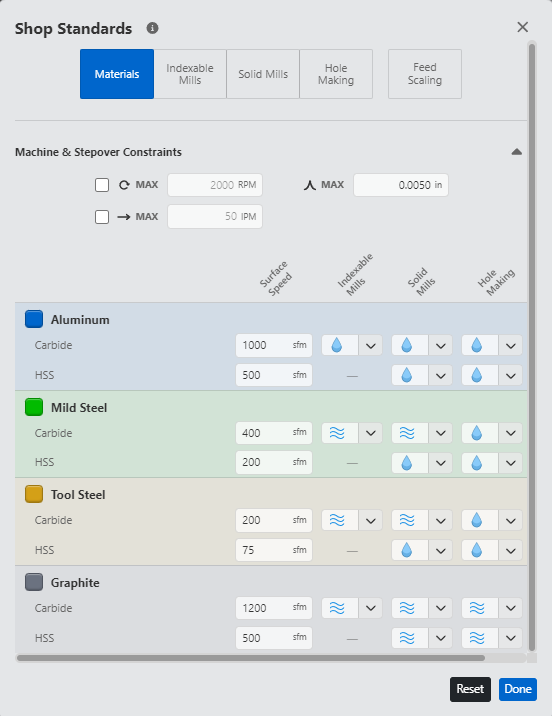
MPH shop standards.
What you can configure
The editor has five pages:
- Materials — baseline surface speed and coolant for common workpiece materials (Aluminum, Mild Steel, Tool Steel, Graphite).
- Solid Mills — baseline cutting data for solid milling cutters.
- Indexable Mills — baseline cutting data for indexable (insert) milling cutters.
- Hole Making — baseline drilling feeds, adjusted Csink/Cbore/Reamer feeds, and Retract feed.
- Feed Scaling — motion modifiers (Lead-In, Lead-Out, Transition, Ramp, Plunge) and how feed per tooth scales with cutter diameter; a Preview shows the resulting chip loads.
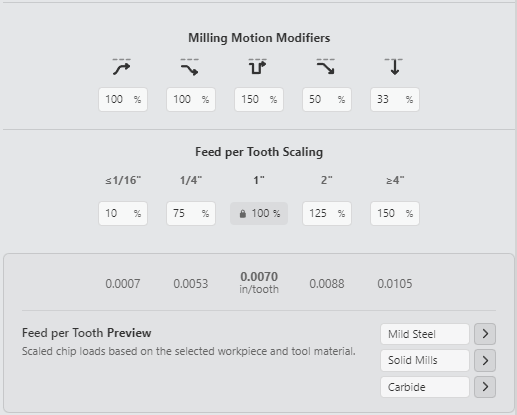
MPH shop standards modifiers.
How MPH applies them at import
Two controls in the Cutting Data section of Import Settings decide how Shop Standards are used:
- Preserve source cutting data (on by default) — keeps the cutting data a tool already carries from the source library.
- Apply during import — when MPH adds Shop Standards cutting data:
- When source data is missing (default) — MPH fills only tools that arrive without cutting data; tools that already have source data keep it.
- With every imported tool — MPH generates Shop Standards cutting data for every supported tool.
- Never — MPH adds none.
Recommended workflow
Set your Shop Standards once so they reflect your shop, then keep Preserve source cutting data on and Apply during import at When source data is missing. MPH keeps trusted source data and fills the gaps. Choose With every imported tool to apply your standards across the board.
|
|